TV Leaderboard
Is there a free leaderboard for my technicians?
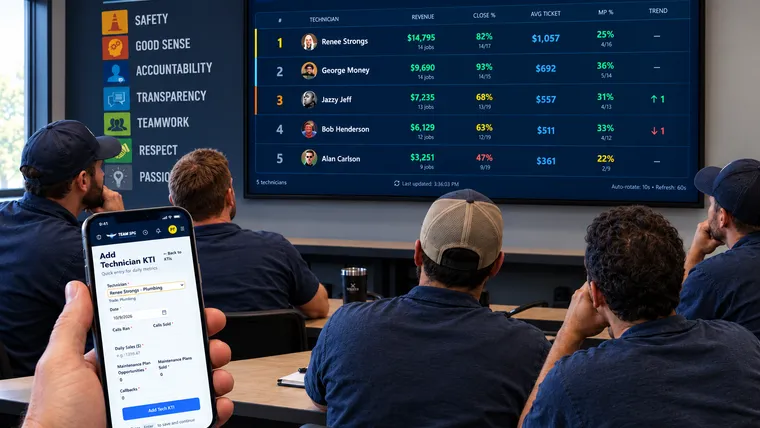
Yes. The TV Leaderboard in SOS Lite is free sales gamification software built for service shops. Your service manager logs calls ran, calls sold, and revenue for each tech, daily or weekly. The board turns those numbers into close rate, average ticket, and maintenance plan rate, then ranks your crew on any TV in the shop.
What free sales gamification software needs to do for a service shop
Most techs do not read a report in your office. They do look when their name is on a TV below someone else's name. That is what a leaderboard does. The tech sees his own numbers next to the crew's numbers, every day, without you saying a word.
A service shop needs different numbers than a sales floor. A sales team can rank reps by calls made and deals closed. A plumbing, HVAC, or electrical tech needs to see his close rate, his average ticket, and his maintenance plan rate next to the rest of the crew. Those three numbers show who is selling the job right, not just who ran the most calls.
SOS does that math for you. Your service manager logs calls ran, calls sold, and revenue for each tech, daily or weekly. The board does the rest.
Why a free sales leaderboard has to do the math, not just keep score
Search for a free sales leaderboard and you will find plenty of scoreboard tools. You type points in by hand and put the board on a TV. That works for a sales floor that counts demos booked.
It does not work for a service shop. Someone has to turn raw numbers into close rate and average ticket. That job usually falls to you or your service manager.
A free sales leaderboard only saves you time if it does the math itself. SOS uses the KTI numbers your service manager already enters and runs the calculation for you. Nobody opens a spreadsheet. Nobody guesses at a tech's real close rate.
What is on the board
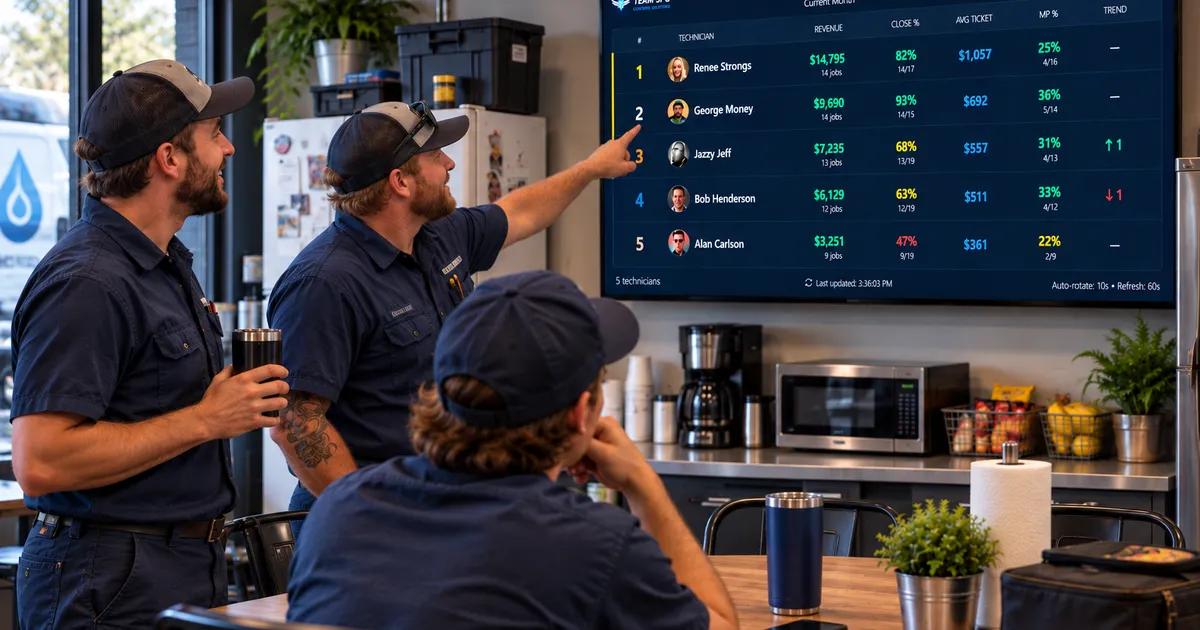
The TV Leaderboard groups your techs by trade and ranks them by revenue. You pick the period: current month, last month, year to date, or last 30 days. Next to each name it shows close rate, average ticket, and maintenance plan rate.
An arrow next to each tech shows who moved up or down since the last period. A tech who was not on the board last period shows a NEW tag instead of an arrow. The board refreshes itself every minute and rotates through pages when a trade has more than five techs.
What free sales gamification changes on the shop floor
Once the board is up, techs stop asking you how they are doing. They check for themselves. A tech who sits at the bottom of the board for three days usually fixes his own numbers before you bring it up.
This is the real value of a public leaderboard. It is not bragging rights for the top tech. It makes the gap visible, so the techs closing under their potential can see where they stand against the crew.
Here is what most owners miss the first month. Do not only praise the tech at the top. Pull the two or three techs at the bottom into a ride-along or a short coaching session that same week. The board tells you who needs help. Use it for that.
How to set up the TV Leaderboard this week
- Sign up for SOS Lite for free using the link at the bottom of this page.
- Add every tech to your roster inside SOS, with their trade.
- Have your service manager log calls ran, calls sold, and revenue for each tech, daily or weekly.
- Open a web browser on the shop TV and go to app.teamspg.com/tv. A short pairing code appears on the screen.
- Click the TV icon on the Dashboard or the Technician KTIs page in SOS and type in that code. The TV switches to the leaderboard.
- Look at the board every morning before the trucks leave.
- Pick the two lowest techs each week and schedule a short coaching session or ride-along.
Do this for one full month and you will have a real baseline. You will know your shop's close rate and average ticket by tech instead of guessing. The TV Leaderboard setup video walks through the pairing steps in under two minutes.

Related questions
How do I put the leaderboard on my shop TV?
Open a web browser on any smart TV, or on a computer plugged into a TV, and go to app.teamspg.com/tv. Type the code it shows into SOS from the Dashboard, the Technician KTIs page, or Company Settings under TV displays. The [setup video](https://teamspg.com/help/video/setting-up-the-tv-leaderboard/) shows each step.
Is the sales leaderboard free, or does it cost more as I add trucks?
The TV Leaderboard is part of SOS Lite, which is free. There is no per-tech charge as you add techs. SOS Pro adds paid features on top of SOS Lite. See teamspg.com for what each plan includes.
What happens if a tech has zero calls one day?
Nothing bad. The board adds up each tech's numbers over the period you pick, so a day with